Sabadell Online Account
There for you, so you can do it all
Your interest-bearing account for your daily transactions offers you multiple advantages: it's time you got to know them and took full advantage.
Bringing over your salary and activating Bizum in your Sabadell Online Account earns you €4004
Sabadell Online Account
Current Account
+
Savings account
2 accounts in 1
Function independently
Interconnected
Profitability
When you are in your
current account
-

No account management or maintenance fees. -
Your money is always available, with no conditions or minimum period requirements. -
You earn remuneration1 from the first € you deposit in your account, with no minimum amount. -
You pay no debit and credit card issuance or maintenance fee.
-
We will give you a 3%2 cashback on your electricity and gas bill payments with no amount limit. -
Send money with Bizum free of charge. -
Take out money by debit for free3 in Euro6000 ATMs. And by mobile, with Instant Money at Banco Sabadell ATMs. -
Keep track of all your account movement in real time with the app.
When you are in your savings account
-

Your account keeps your savings separate from your daily account movements. -
You are paid interest indefinitely on the joint balance of both your accounts, with no maximum time limits. -
Currently, you earn 2.5% APR for the sum total of your balance in both accounts on balances of up to €50,0001 during the first 12 months.
Have you activated your savings routine?
Pay day

Regular contribution

Rounding

Rainy day plan

With your people and your shopping, your Bizum
-

Log into the app. -
Find Bizum on the side menu. -
Select your account and confirm your details.
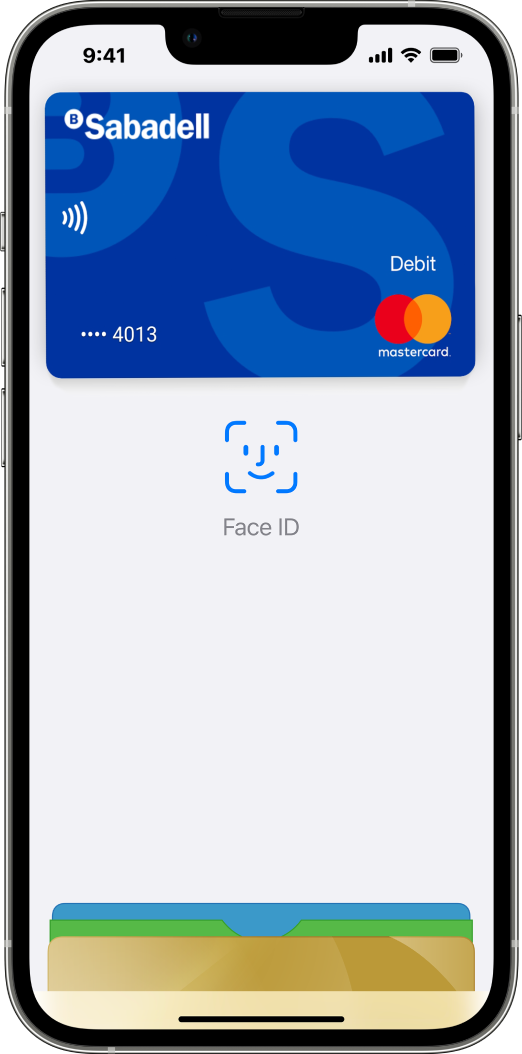
Mobile payment: Your card is not only in your wallet




Direct deposit your salary4 in your Sabadell Online Account
-
You can easily manage your day-to-day transactions. We notify you instantly when you receive your salary. And you can increase your balance monthly. Include your salary in your customised savings routines. -
To direct deposit your salary, share the IBAN number with your employer, which you can copy from the app in the “Account Information” section.
Stay home and get the most out of your bills

FAQs.
Wherever you are, we are there with you

Basic questions?

Need to speak with us?
It’s on your app


FAQs - Savings account
The interest earned on your Sabadell Online Account is settled every month. Payment for each monthly period is made on the 15th day of the month (or the first working day) following each month of settlement for the duration of the promotional offer.
To calculate the remuneration of the Sabadell Online Account, the average balance in the Sabadell Online Account and in the associated Savings Accounts of the holders will be taken into account (with a maximum limit of €50,000 for the 2% APR promotion and €20,000 for the 6% NIR promotion). The amount of monthly interest paid may vary depending on the number of days in the month (28, 30 or 31). Remember that you can check the subscription details by downloading the document "ABON. PROM. C. ONLINE SABADELL" in your Correspondence area.
Design a budget and financial plan that suits your needs and goals. Analyse your income and expenses to identify areas where you can reduce expenses and earmark that money to savings. Automating your savings through periodic contributions can also be an effective strategy. It is advisable to do it at the beginning of the month, as soon as you receive your salary, this will help you save consistently.
In addition to transfers from your regular account through the savings routines you have activated, you can make transfers from your other accounts or euro transfers from Spain or the European Economic Area (EEA). There is no limit on the amount of these deposits.
In addition to transfers from your regular account through the savings routines you have activated, you can make transfers from your other accounts or euro transfers from Spain or the European Economic Area (EEA). There is no limit on the amount of these deposits.
In addition to transfers from your regular account through the savings routines you have activated, you can make transfers from your other accounts or euro transfers from Spain or the European Economic Area (EEA). There is no limit on the amount of these deposits.
The money in your Sabadell Savings Account is immediately and fully available without any additional penalties or requirements. To withdraw some of your savings, go to the «Accounts» > Transferencias > Domestic transfers and transfers in euros. When you select your savings account, the linked account will be defined by default as the target account. Then fill in the amount, the description and sign the transaction.
FAQs - Direct depositing your salary
You can check the incentive payment date in the terms and conditions of the promotion.
To have your salary paid directly into your Banco Sabadell account, you must quote the IBAN number of the account to the human resources department of your company or payer. You can view the IBAN for each account you have on the home screen. This information is displayed below the name of each account.
If you need to present a certificate to prove that you are the holder of your account, you can request it by logging in to your remote banking on the website, from the Accounts menu > Certificates > Request certificates. Then, select Account Holder Certificate and follow the steps.
If you need to present a certificate to prove that you are the holder of your account, you can request it by logging in to your remote banking on the website, from the Accounts menu > Certificates > Request certificates. Then, select Account Holder Certificate and follow the steps.
The date on which a salary is paid depends on a number of factors, such as the day and time the company makes the transfer and the receiving bank. As a general rule, it can be noted that:
• Salary transfers between Banco Sabadell accounts are credited on the same day.
• Salary transfers to a bank other than Banco Sabadell are normally credited on the subsequent working day, as long as the transfer is made on a working day before 6:00 pm. On the other hand, if the transaction is made on a non-working day (Saturday, Sunday or public holiday), the salary payment may take up to two working days.
For more information about the day on which your company sends out payslips, you should contact your employer's appropriate department.
• Salary transfers between Banco Sabadell accounts are credited on the same day.
• Salary transfers to a bank other than Banco Sabadell are normally credited on the subsequent working day, as long as the transfer is made on a working day before 6:00 pm. On the other hand, if the transaction is made on a non-working day (Saturday, Sunday or public holiday), the salary payment may take up to two working days.
For more information about the day on which your company sends out payslips, you should contact your employer's appropriate department.
FAQs - Savings routines
You can change the routine of your Sabadell Savings Account, from the Savings menu > Savings and select your Sabadell Savings account and choose the routine that best suits your daily routine or deactivate it if you no longer wish to continue saving.
FAQs - Direct debiting bills
The 3% cashback on your electricity and gas bills paid by direct debit will be paid quarterly, on the 15th (or previous working day) of January, April, July and October.
To check your bills paid by direct debit, go to Accounts > Direct debits > View direct debits. Then select the debit account and press "continuar".
You can have a new bill debited by contacting the company to which you are making the payment and providing them directly with the IBAN code of your Banco Sabadell account.
You can also do this by signing in to the Banco Sabadell website and accessing the menu Accounts > Direct debits > Direct debit bills. Then follow the steps below:
1. Choose which Banco Sabadell account you want to direct debit your bills from.
2. Download the PDF of the application form, fill in all the information and sign the document.
3. Upload the duly completed document to the platform.
4. And finally, add the bills you wish to have paid by direct debit and fill in the details requested.
We will convey your request to the issuer.
You can also do this by signing in to the Banco Sabadell website and accessing the menu Accounts > Direct debits > Direct debit bills. Then follow the steps below:
1. Choose which Banco Sabadell account you want to direct debit your bills from.
2. Download the PDF of the application form, fill in all the information and sign the document.
3. Upload the duly completed document to the platform.
4. And finally, add the bills you wish to have paid by direct debit and fill in the details requested.
We will convey your request to the issuer.
Go to Accounts > Direct debits > Payment of non-direct debit bills. From this same screen you can set up a direct debit so that, in the future, the issuer will debit it directly to the selected account.
Remember that to do this you must also submit the direct debit order to the issuer.
Remember that to do this you must also submit the direct debit order to the issuer.
Go to Accounts > Direct debits > Change account. You can change one, various or even all the direct debits in the account. Tap on “Change account” and select the account where you want to change the direct debits.
If you have received a message indicating that you have a bill pending direct debit due to insufficient funds in your account, you have until 1 pm on the next working day to make the payment into your account. Once the payment has been made, the charge will be made automatically during that afternoon (so you will not see it show up immediately), as long as there are sufficient funds to meet this bill and the rest of the pending payments. If there are several pending items with different dates, they will not be debited on a first in first out basis.
RRemember that after this period the bill cannot be retrieved and you will need to contact the issuer to arrange payment.
RRemember that after this period the bill cannot be retrieved and you will need to contact the issuer to arrange payment.
To return a directly debited bill, go to Accounts > My accounts and movements, select the account and click on the link labelled “Return” below the bill amount.
You can also return a bill from Accounts > Direct debits > Return bill (charged to account), clicking on the icon to get the link that will allow you to return it.
Remember that the maximum period to return a bill is 8 weeks, except for certain issuers, whose period is shorter.
You can also return a bill from Accounts > Direct debits > Return bill (charged to account), clicking on the icon to get the link that will allow you to return it.
Remember that the maximum period to return a bill is 8 weeks, except for certain issuers, whose period is shorter.